Upcycle #1: Reviving a locked-down Android projector back to life
Android projector sideloading: When an Android TV device lacks USB/ADB access and has a locked-down launcher, you can still install APKs by serving them from a local Python HTTP server on your laptop, then downloading them through the device’s built-in browser. This method works on any Android TV device with a browser and no developer access.
Introduction
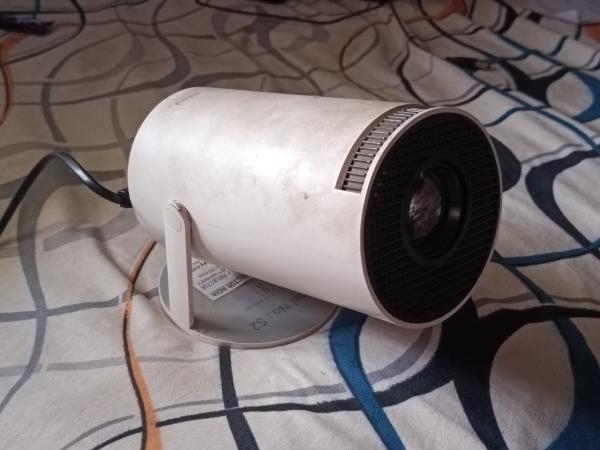
My family bought this Android projector back in 2020 during lockdown so we could watch things on a really big screen. It was working okay-ish, but fast forward 6 years and Netflix dropped support for Android 7 (the Android version on this projector), and so did a lot of OTT apps. While YouTube does work, the UI lags when moving around. Now it’s just sitting in a corner, collecting dust.
Now, as a student pursuing an engineering degree, it would be a shame if I didn’t revive it.
Here’s a list of what I want this potato to do:
- Streaming support for movies, shows, etc.
- Retro gaming console (Part 2)
But, but. Here’s the problem. This projector is really locked down.
- Doesn’t have a USB port.
- Can’t open stock Android settings to enable Wi-Fi debugging.
- These guys replaced the home launcher with their own.
- Doesn’t even have the Play Store. They replaced it with Aptoide which is trash.
So no ADB sorcery can be done.
So, now what? Well… let’s go back to basics. Good ol’ python -m http.server and a browser.
This guide works on any Android TV device with a browser and no USB/ADB access.
Setup
Requirements
- A browser on the projector.
- A laptop with Python on it.
- Brain (Optional)
The projector already had a barebones Android WebView browser.
Searching for APK(s)
There are 2 ways to obtain APKs:
- APKMirror: For getting untouched APK dumps of proprietary apps.
- OSS Apps: GitHub, F-Droid, etc.
With a single search, I found a list of cool FOSS apps for Android TV. Here
Here’s the list of apps I chose:
- LTvLauncher: For replacing the current launcher. Clean and customizable UI. Works for me.
- KeyMapper: For remapping the home button to LTvLauncher.
- SmartTube: YouTube client.
- Stremio: For streaming movies and shows from a media hub.
- Play Store: Replaced Aptoide.
- Chrome: Replaced the custom Android WebView browser.
Transferring and Downloading Apps to the Projector
Placed everything in my share folder and started the HTTP server.
python -m http.server
Serving HTTP on 0.0.0.0 port 8000 (http://0.0.0.0:8000/) ...
Find your laptop’s private IP. (Usually starts with 192.168.xx.xx or 10.xx.xx.xx)
ip a | grep inet
Now, go to IP:PORT on your browser. (In my case, it is 10.115.90.1:8000)
You will see a list like this. Click on the APK(s) to download them.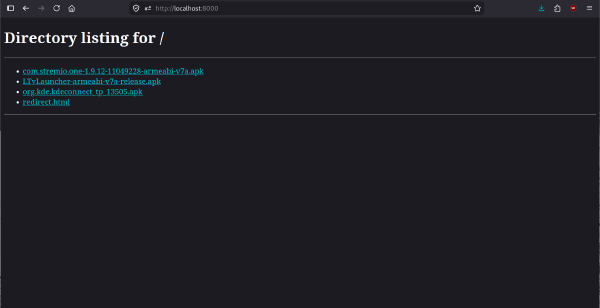
Voila! Everything is downloaded.
I went ahead and set up everything. Remapped the home button, set up Stremio, SmartTube, and customized the launcher.
Conclusion
It doesn’t matter how locked down a device is or how old it is, there’s always a way to upcycle it.
In my case, the fix was easy. I just had to install APKs via a simple HTTP server instead of ADB, and replace the launcher so I could access stock Android settings.
Related Reading
- Matra: Custom tokenizer for Indic languages
- Desi Maximalism: Text-to-image LoRA for South Asian aesthetics
- Connman systemd-resolved: Linux network configuration
- Gemini Gemtext: Lightweight protocol reference